
AI support that actually solves the problem
Most people have tried “AI support” by now. It can often explain what is wrong. In practice you still end up clicking around a control panel, comparing screenshots and hoping you found the right setting.
At Hostup we have built something different: an agentic AI that can act in your environment through our API. It does not just reason about your configuration. It can also propose a concrete fix and make the change right away – once you give it permission.
This post explains what an AI agent is and how it differs from an ordinary chat. It also shows three examples of real problems the agent can solve in seconds.
What is an AI agent?
An “ordinary” AI chat is basically a text engine: it reads your question and answers with text. It can be smart, but it normally has no direct connection to your actual environment.
An AI agent is a system that can:
- read your real configuration (DNS, email, VPS settings)
- put together a proposal with reasons (what is wrong, why, and what should be done)
- carry out the change through a controlled interface (our API), with logging and clear steps
The difference is simple: a chat is good at explaining. An agent is built to act.
Why it makes a difference in practice
In hosting, many issues are “easy” for a technician but painful for the customer:
- a wrong MX priority
- a missing SSH key
- a VPS that is stopped
- a website that does not respond because a port is blocked
- a setting that looks right but is wrong in one single place
When an agent can read the same information you see in the control panel and has tools to change it, all the “searching” disappears. You get a fix with a clear reason – and it gets done.
Example 1: “email works sometimes” and clashing MX records
A classic support case: someone says email is delivered “sometimes”. The cause is often that the domain has several MX records with the same priority, and one of them is an old or wrong placeholder.
When two MX records have the same priority, delivery can be split randomly between them. It works when the right server is picked and fails when the wrong one is.
How the agent works:
- reads the DNS zone
- finds that two MX records have the same priority
- explains the consequence (intermittent delivery)
- proposes removing the wrong record
- makes the change through the API when you approve
The result: email is routed consistently to the right server.
Example 2: SSH keys and VPS actions in plain language
Another common scenario: you want to add an SSH key and then restart or start a VPS.
Instead of navigating menus, you can write:
- “which SSH keys do I have?”
- “add this one to my VPS”
- “start the server”
The agent can then:
- list your keys (for example name and fingerprint)
- add the key to the right server
- start the VPS
The agent can also check whether ports 80 and 443 answer on the server. If the QEMU guest agent is running, it can also see things that need a view inside the server, such as memory use and which SSH keys actually grant access.
The point is not to “talk to a server”. The point is that you no longer have to switch between chat, guides and control panel. One conversation is enough.
Example 3: pointing a domain to Google Workspace
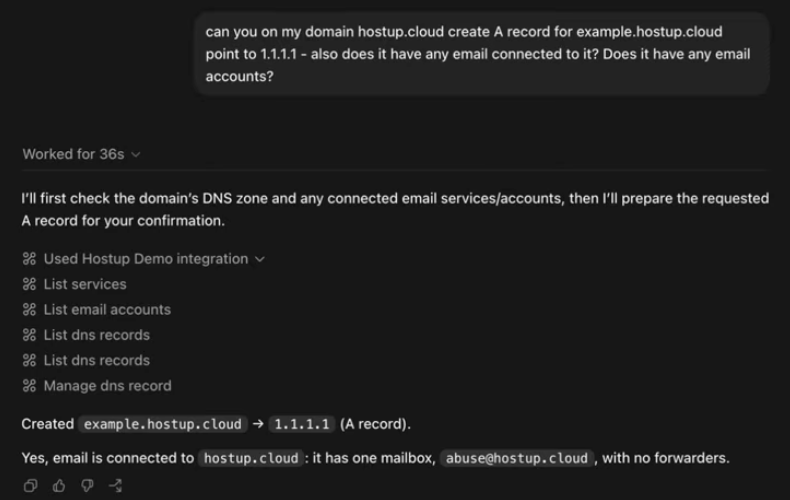
The agent can do much more than these examples. Say you want to point your domain to Google Workspace. You simply say which domain it is about, and perhaps send a link to Google’s instructions. The agent takes care of the rest.
How it works technically
This only works if the platform is built for it. Hostup is API-first: the control panel is not “the only way in”, and everything can be read and done through the API. Our open documentation lists more than 280 endpoints the agent can use.
To make the agent both practical and predictable, we have built a clear pipeline:
1) A tool map: the agent knows what it may do
We have indexed our OpenAPI specification and internal knowledge, so the agent can find the right functions (and the right parameters) for each task instead of guessing.
2) Knowledge that can be reused
We summarise recurring support problems and their solutions in anonymised form and index them. When someone asks about, say, a “550 error”, the agent can:
- find similar earlier cases
- suggest a likely cause
- check real signals through the API (for example the delivery log)
- propose next steps and, if you want, carry them out
...--- Result 3 (score: 0.89) ---Category: Email sending issueStatus: resolvedDept: General - Web hostingIssue: Customer experienced intermittent failure sending emails, receiving a '550 5.7.1 [ESR] Rejecting for policy reasons' error....Solution: Support confirmed a queue backlog caused by a compromised account was cleared, and confirmed outbound mail flow is restored.......3) Safe execution: proposal first, action second
The agent should not “just run”. It should:
- show what it intends to change
- explain why
- ask for permission
- make the change
- confirm what was done
That is essential for trust in operations.
Security and control
When AI gets “hands”, it has to be built with the same discipline as all other operations:
- clear permission: no changes without approval
- least privilege: the agent can only do what you allow
- traceability: you can see what changed, when and why
- predictable actions: the agent uses documented API endpoints, not “magic” shortcuts
This is also one of the reasons API-first matters so much: a well-built API gives control, logs and clear limits.
In the client area, the agent creates its own API key for each run. The key only covers your account and only what the agent’s tools need. It is removed when the run is finished. If you connect Claude or ChatGPT to your account instead, you choose which permissions the app gets.
Why we think this is the future and not a bubble
There is a lot of hype around AI. But in hosting and operations the value is easy to verify, because the outcome is measurable:
- a DNS error actually gets fixed
- a VPS actually starts
- email delivery actually becomes stable
This is not “AI that writes text”. It is AI that connects intent (“do X”) with a controlled action in the systems you already use.
When AI becomes an interface to automation, much of the friction in support disappears. That is exactly where the value is clearest.
Try it yourself
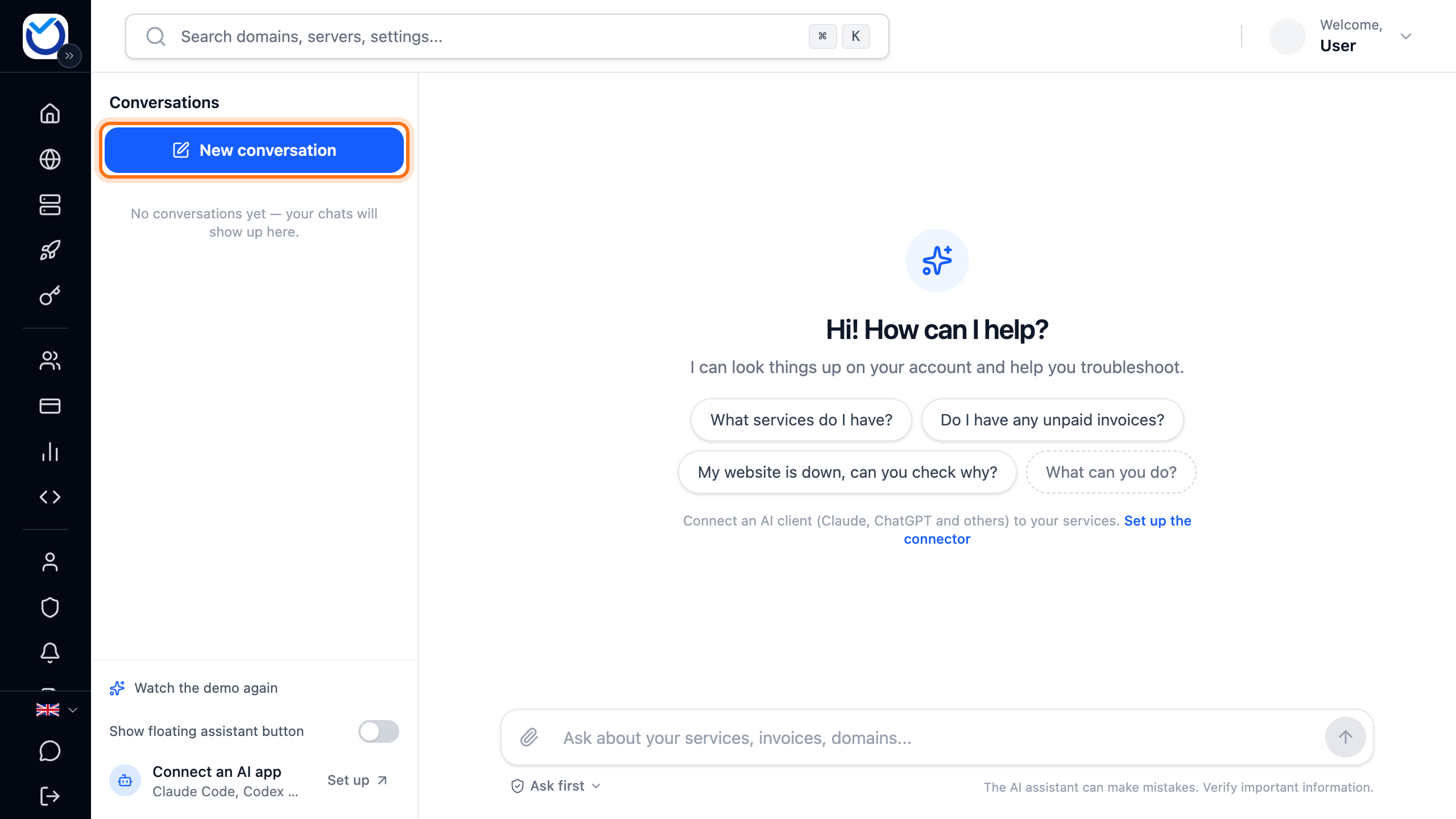
The agent is the AI assistant in the client area. Click AI Assistant in the menu or open cloud.hostup.se/assistant. Read more in AI assistant: ask questions, make changes, use Telegram.
Prefer Claude or ChatGPT? Connect the app to your account. Read more in Connect Claude or ChatGPT to your account (MCP).
Frequently asked questions
What is the difference between an AI chat and an AI agent?
An AI chat can explain and give advice, but it normally has no direct access to your actual environment. An AI agent can also use tools (such as an API) to read your configuration, propose a concrete fix and – once you approve – carry out the change with traceability.
Can the agent make changes without my permission?
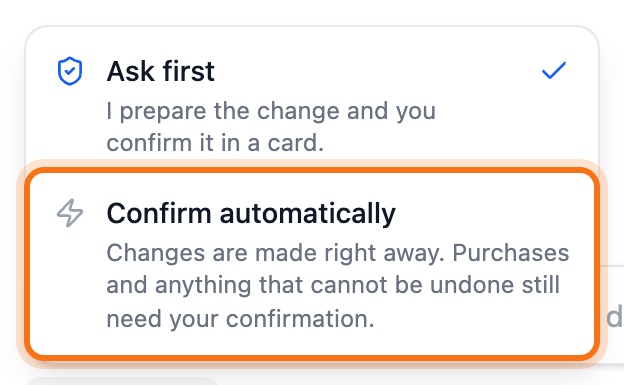
Not unless you choose that. By default the agent first shows what it wants to do and why. Changes only happen after you approve them. In the client area you can let routine changes go through directly. Anything that costs money or cannot be undone still needs your approval. If you connect Claude or ChatGPT to your account, you can give the app read-only access or pick exactly which permissions it gets.
Which hosting problems suit an AI agent best?
Anything recurring, time-consuming and verifiable in the system: DNS (MX, TXT, SPF/DKIM/DMARC), email routing, SSL/TLS and certificates, VPS actions (restart, backups, firewall/ports), troubleshooting a website that does not respond, and common WordPress problems where the agent can point out clear causes and propose safe next steps.
Does this only work at Hostup?
Out of the box it works at Hostup, because the agent is built on our API and our objects (DNS zones, VPS, mailboxes and so on). The concept itself works in any environment with a well-built API and clear permissions – but then an integration is needed.