 English
 Swedish



First, you need to log in to your cPanel account. You can do this by entering cpanel.yourdomain.se in your browser and providing your login credentials.
You can find the username and password in the email with the subject Get Started with Your Web Hosting. You received it when you purchased your web hosting.
As a Cloudflare Partner, we have had the opportunity to build an amazing integration (swedish). Protecting your website from threats is truly something we are passionate about. In cPanel, under HostUp Features > Cloudflare, you can manage this setting.

By default, we implement many great security features such as blocking known bad automated traffic, setting up DDoS protection, redirecting from http to https, and much more in the background. However, not everything we recommend is enabled.
As a default setting, we try not to be too aggressive in what we do. We don’t want it to affect anyone negatively, even if only 1 in 10 were to experience problems.
We recommend that you take a few minutes to read through the description below and activate the security features you think would suit your website well!
Description of Features
Below is a description of all the security features you can configure as shown in the image above. We recommend checking all the boxes, but if you encounter issues with something not working as it should, we suggest unchecking the “bot protection” rule and also allowing foreign traffic if you choose not to permit this.
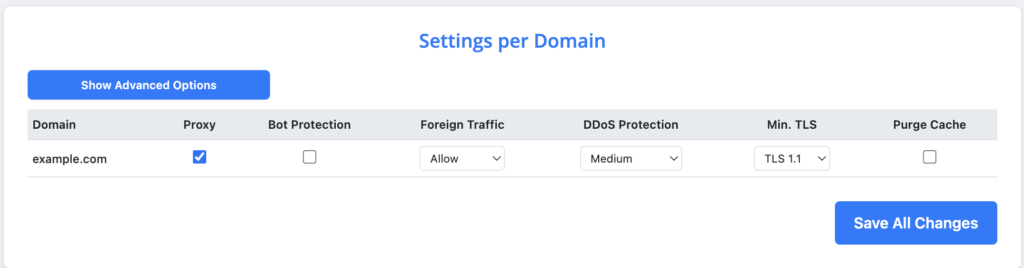
Proxy
Controls whether your website’s traffic is routed through Cloudflare. We recommend keeping this enabled. With this option you get a basic WAF that protects your site against known vulnerabilities, DDoS protection, and a CDN that speeds up your site for global traffic.Bot protection
Bot protection blocks known automated traffic except verified and trusted bots. Trusted bots belonging to search engines, such as Google, or certain WordPress plugins like Jetpack, are allowed.We recommend enabling this to block automated traffic that, for example, harvests email addresses (for spam), runs scrapers that can burden your website, launches overload attacks from unknown botnets, and other automated traffic that poses a threat.
List of all trusted bots: Cloudflare Verified Bots.
Block or challenge non-Swedish traffic
Here you can choose how to handle visitors who do not come from Sweden. You can disable the feature (off), have them meet a so-called Challenge (a captcha-like test to verify they are not a malicious bot), or completely block them.Note: Search engines such as Google and certain other verified bots (Stripe Webhooks, Klarna and others) are allowed through based on their verified bot category. All other foreign traffic is either challenged or blocked, depending on your choice. By default this applies for Swedish traffic but if your core audience is for example Norwegian, just reach out to our support and we’ll modify this for you!
Setting this option to Challenge is recommended for most websites. Read more about why we recommend this setting.