
Change your billing cycle: pay monthly or yearly
Checked against the client area 29 October 2026
You choose how often your VPS or web hosting is invoiced, for example every month or once a year. The client area calls this the billing cycle.
Open your servers in the client area
How to
Section titled “How to”- Open the billing cycle for the service:
- VPS: go to VPS, open the server and go to the Billing tab. Scroll down to Billing Cycle Management.
- Web hosting: go to Dashboard and scroll down to Web Hosting. Click More next to the hosting account and choose Change Billing Cycle. Below the package you can also click Switch to yearly if you pay monthly, or Change billing interval if you pay yearly.
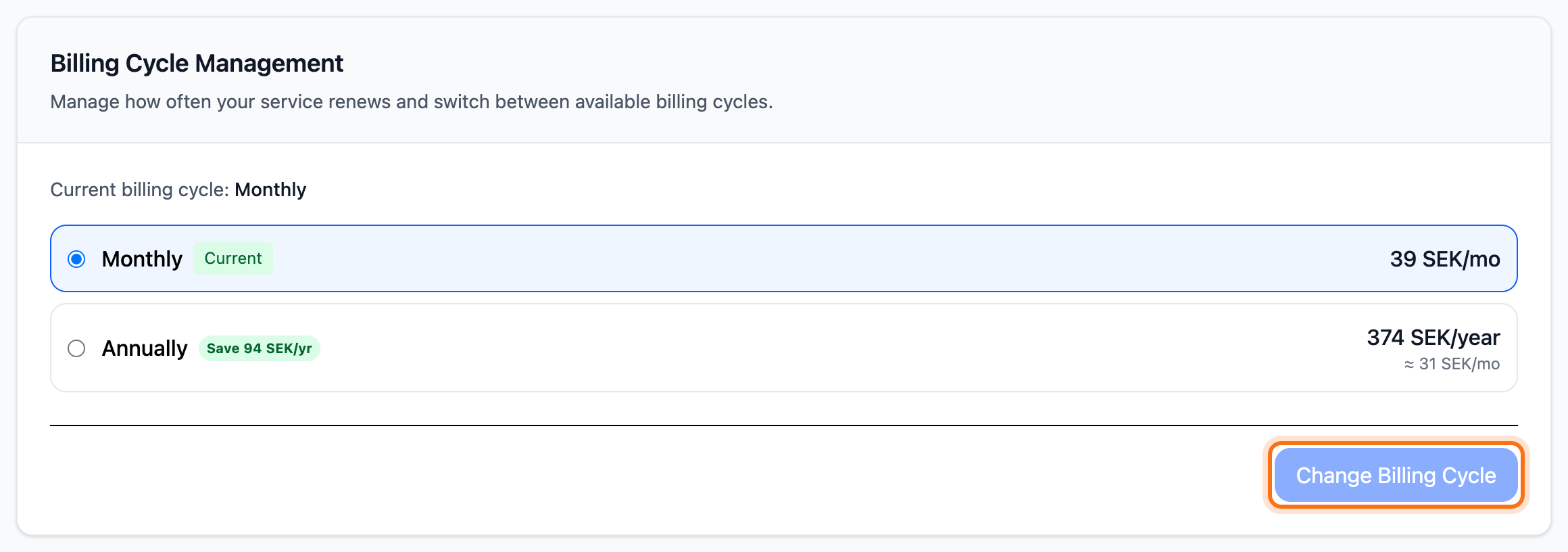
- Pick the new cycle in the list. Each cycle shows its price. Longer cycles also show roughly what they come to per month. If a longer cycle is cheaper, it says how much you save per year.
- Click Change Billing Cycle (in the web hosting dialog: Change Billing Cycle). The button can be clicked once you have picked a cycle other than the current one.
What happens next
Section titled “What happens next”The cycle changes straight away. The time you have already paid for stays the same. Your next renewal invoice covers the new cycle at its price.
If an unpaid invoice already exists
Section titled “If an unpaid invoice already exists”If the service already has its renewal invoice, you can pay it first and change the cycle afterwards. To change straight away, the invoice is cancelled and a new one is created for the cycle you chose.
- VPS: when you click Change Billing Cycle, the Unpaid invoice detected dialog opens. Click Cancel Invoice & Apply Now.
- Web hosting: the dialog shows Unpaid invoice detected above the cycles. Tick Cancel the existing invoice and create a new invoice for the selected billing cycle. Then click Cancel Invoice & Apply Now.
When the new invoice is ready, you are taken straight to it to pay.
Good to know
Section titled “Good to know”- If you have scheduled a downgrade, the cycle can only be changed once the downgrade has taken effect. On a VPS the card says so. Read more in Upgrade or downgrade your service.
- Web hosting with an overdue invoice cannot change its cycle. Pay the invoice first.
- When you change package on a VPS, you choose monthly or yearly billing for the new package in the same step.
- A VPS billed by the hour has no Billing tab. You pay for the time it runs. Read more in Create a VPS billed by the hour.
- A domain has its own billing period in whole years. Read Renew your domain.
- If the service only has one cycle, it cannot be changed. The button cannot be clicked then.