
Close your Hostup account
Checked against the client area 29 October 2026
If you no longer use Hostup, you can close the account yourself in the client area. Your personal details are then removed and nobody can sign in to the account. The account can be closed once nothing is left on it: no services, domains, object storage, unpaid invoices, pending orders or credit.
Open Close account in the client area
Before you start
Section titled “Before you start”End whatever is left on the account.
- Cancel a VPS under Settings › Request Cancellation and web hosting under Web Hosting › More › Request Cancellation. If you choose cancellation at the end of the period, the account can only be closed once the period has run out.
- Cancel or transfer your domains. See Cancel a domain and stop the renewal invoice or Transfer a domain away from Hostup.
- Pay unpaid invoices and finish or cancel any pending orders.
- If the account has credit left, we pay it back. Only we can do that. Open a ticket
- If you have turned on object storage, it also stops the closure. It cannot be turned off in the client area. Include it in the same ticket.
If someone else is taking over a service, move it to their account instead of cancelling it. See Move a service or domain to another account.
How to
Section titled “How to”- Click Account in the menu. Scroll to the bottom of the Account details tab.
- Click Close account under Close account.

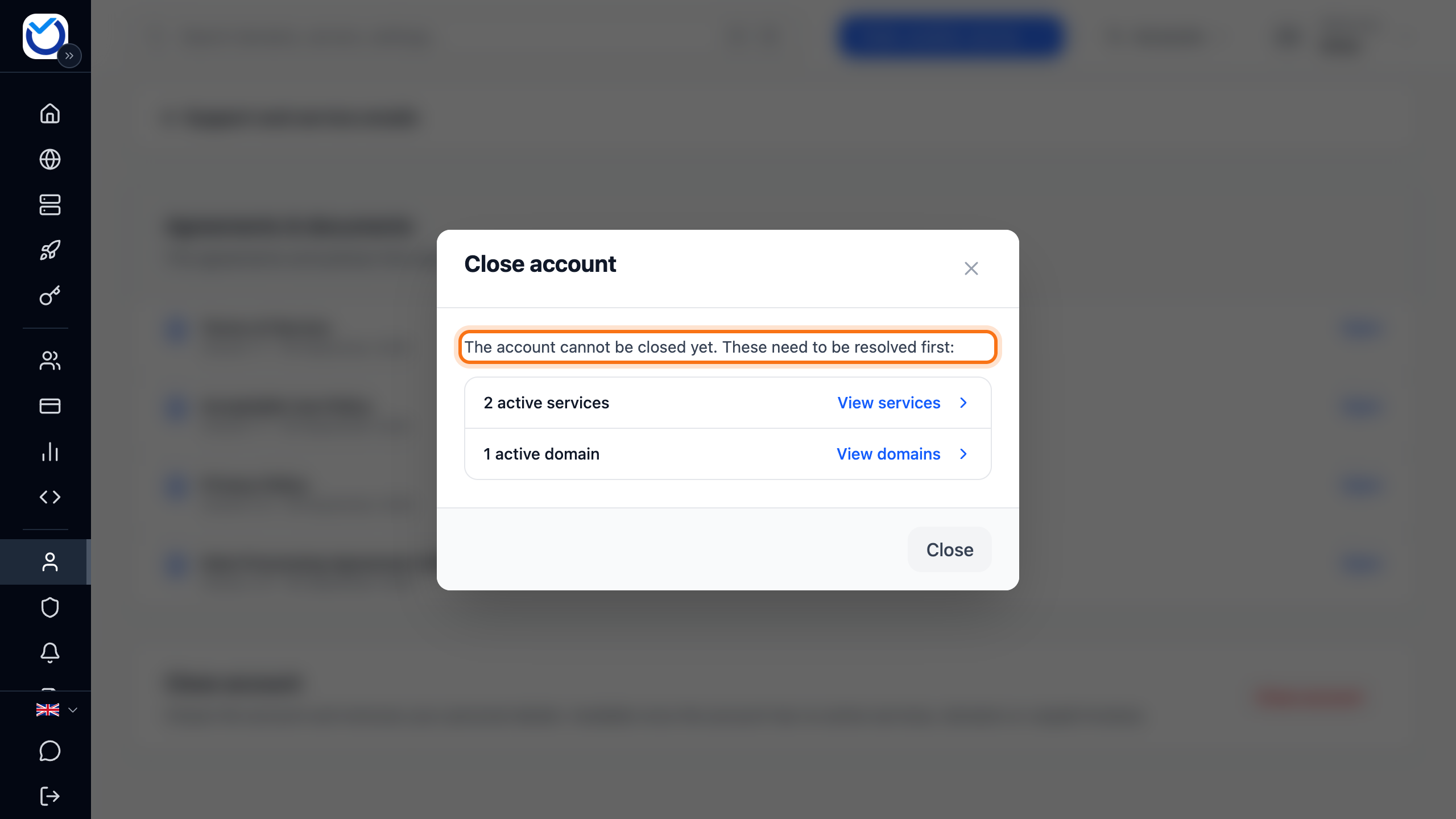
- The client area checks the account. If it says The account cannot be closed yet. These need to be resolved first:, the box shows what is left. Click a row to go there and sort it out. Then open the box again.
- Once the account is ready to close, the box shows what will happen. Enter your password under Current password. If you have linked BankID to the account, you can click Confirm with BankID instead of password instead. You identify yourself with BankID and come back to the box. It then says Confirmed with BankID — no password needed.
- Click Close the account.
What happens next
Section titled “What happens next”The box shows The account is closed. A confirmation goes to the account’s email address. Click Done to go to the sign-in page.
- Name, address, phone number and personal or organisation number are removed from the account.
- Invoices that were already issued are kept as Swedish accounting law requires.
- Open support tickets are closed. The box shows how many before you confirm.
- Users you added to the account are removed. BankID sign-in to the account is removed too.
If you want to come back later, create a new account. You can use the same email address.
Good to know
Section titled “Good to know”- Only the account owner can close the account. A user or partner with access does not see the box.
- If you have several accounts, close each one separately.